Invoice scanning: OCR reads the numbers – AI understands the invoice
Classic invoice scanning works like a cut-out stencil: lay it over the invoice, and the holes show the amount, the date and the invoice number – as long as the supplier doesn't move anything.
AI data capture has no stencil. It reads the invoice the way a bookkeeper does: it finds the total wherever it happens to be, and understands that "Annual licence, 5 users" is software and not consultancy hours.
That difference decides how much you have to key in, correct and maintain yourself. This article is part of our guide to automated invoice processing.
What is invoice scanning?
The term covers three different things:
- Digitisation. A paper invoice or receipt becomes a PDF or an image – with a scanner or a phone. In everyday speech this is often called document or receipt scanning.
- Data capture. The PDF or image becomes data: supplier, amount, VAT, dates and lines, ready for bookkeeping. Some vendors call it data extraction. This is where OCR and AI differ.
- Scan-in service (Læs-ind-service). A service for suppliers that invoice the Danish public sector: they send paper or a PDF to a scanning bureau, which turns the invoice into an e-invoice. It is about sending invoices, not about receiving them.
The rest of this article is about data capture.
OCR or AI?
How OCR reads an invoice
OCR (optical character recognition) turns the image of an invoice into text. It does not know that "12,500.00" is the total, or that "DK 12345678" is a CVR number (the Danish company registration number).
The fields come from a layer on top: the stencil from the introduction – one per supplier layout – or rules that look for words such as "Total" and "Due date". That works on layouts the system knows. When a new supplier comes along, a new template is typically needed, and when a layout changes, the template has to be corrected.
Even when the fields are right, OCR does not know what the invoice is about. Account coding, VAT codes and approvers are controlled by rules that you build and maintain yourself.
How AI reads an invoice
AI data capture replaces the templates with a single model trained on many invoices. It finds the fields from text, position and context – not from where they were last time.
Researchers from DTU (the Technical University of Denmark) and the e-invoicing platform Tradeshift showed as early as 2017 that it can be done. Their system, CloudScan, was trained and tested on 326,471 invoices from 8,911 senders. On invoices from senders the system had never seen, it captured eight key fields only slightly less accurately than on known ones.
Newer AI models can read the image directly – text, position and meaning all at once. In 2025, the German research institute Fraunhofer IAIS tested eight of them on invoices and receipts. The best one captured 96.5% of the fields correctly on clean, computer-generated invoices, 92.7% on scanned invoices and 87.5% on scanned receipts. When the models were instead given the invoice converted to text first, accuracy on the scanned invoices fell to 64% at most, and on the clean invoices almost all models landed at 84–85%. The researchers therefore point to the conversion to text – not the models – as the bottleneck.
When the model understands the content, it can do more than capture data. It can suggest an account based on what was bought, and route the invoice approval according to who is responsible for the expense.
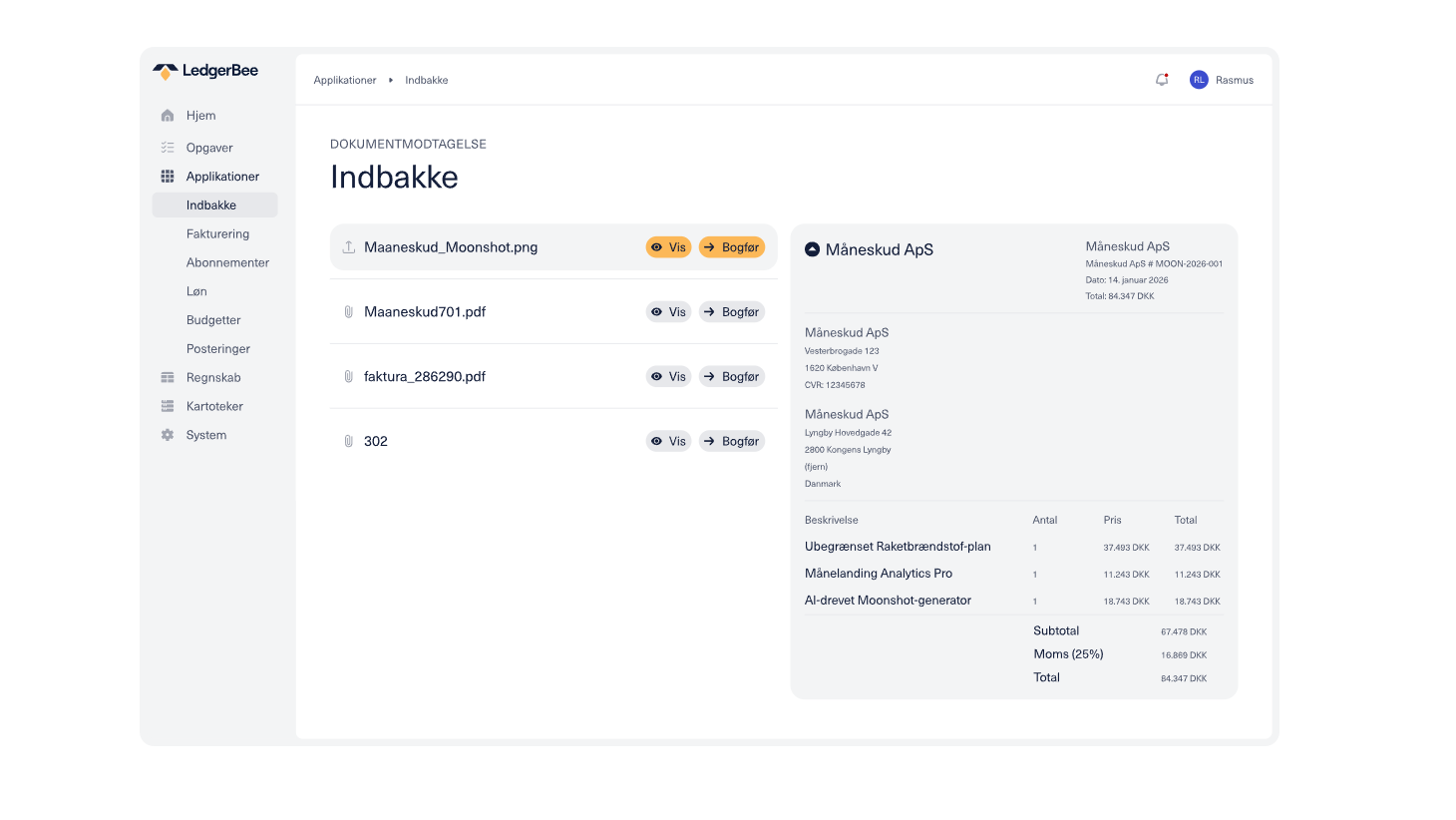
That is how LedgerBee works: Hivey AI reads the whole document and captures it line by line. LedgerBee is a finance system for SMEs – and the accountants and bookkeepers who serve them – who want to bring all their finances together in one place.
The lines are already there
The Danish VAT rules require a full invoice to show the nature and quantity of what was supplied, the taxable amount, the VAT rate and the VAT amount. So the information is on the invoice. The question is whether your system reads it – or puts the whole amount on one account, leaving the bookkeeper to split it up afterwards.
The difference in brief
Template OCR — AI data capture
How the fields are found — Fixed positions or keywords per layout — Text, position and context
New supplier — Typically requires a new template — Can read layouts it has not seen before
New layout from a known supplier — The template has to be corrected — Nothing to correct
Account coding — Rules per supplier that you maintain — Suggestions based on what was bought
Poor scans — More errors — More errors – which is why checks are needed
Corrections — Templates and rules are updated manually — The model can learn from them
Many systems sit somewhere in between – for example OCR with an AI model on top.
What accuracy means
When a vendor states 98% accuracy, ask: per field or per invoice? You do not post fields – you post invoices. An invoice that is to be posted and paid has around ten fields that all have to be right: supplier, CVR number, invoice number, invoice date, due date, amount before VAT, VAT, total, currency and payment details.
If 98% of the fields are right, and the errors fall at random, all ten fields are right on only around 82% of the invoices (0.98¹⁰). At 99% it is 90%. In practice the errors cluster on the poor documents, so the calculation is rough. But the point holds: the figure that matters is the share of invoices that go through without corrections.
Document quality affects the figures noticeably. In the Fraunhofer test there were nine percentage points between the best model's result on clean invoices and on scanned receipts. And on the clean invoices the IBAN was markedly harder for the models than the other fields – for example, a zero was mistaken for the letter O.
That is why there must be fixed checks on top of the data capture: amount before VAT plus VAT must equal the total, the CVR number must exist in the Danish Central Business Register (CVR), and the account number must match the one you usually pay to. If something deviates, the invoice lands with a person – not in the payment queue.
Five questions for the vendor
- What share of the invoices go through without corrections – and does the figure apply to PDFs and scans or only to e-invoices?
- Does anything need to be set up when a new supplier sends its first invoice?
- Does the system read the lines, and does it code accounts per line?
- Does the AI read the document itself or only the text an OCR has extracted?
- What happens when the system is in doubt – and does it get smarter from the corrections?
What the law requires
If the company is covered by the Danish requirement for digital bookkeeping – and most are – the following applies:
- Purchase documents with six specific pieces of information must be kept digitally. If the document has the date, the nature of the supply, the amount, VAT, payment details, and the buyer and seller with name, address and CVR or SE number, it must be stored in your digital bookkeeping system. If it arrives on paper, it must be scanned or photographed in. Exemptions include paper invoices from abroad that were handed to you in person.
- For five years. Accounting records must be kept for five years from the end of the financial year they relate to.
- On an ongoing basis. Transactions must be recorded as soon as possible. The Danish Business Authority (Erhvervsstyrelsen) recommends, as a starting point, within the current month.
- A PDF is not an e-invoice. The Danish Business Authority does not count image files – PDF included – as e-invoices. Only structured formats such as OIOUBL and Peppol BIS arrive as data that does not need to be captured.
Skip the scanning altogether
An e-invoice via NemHandel or Peppol arrives as data and does not need to be captured at all. The Danish Business Authority has proposed that registration to receive e-invoices becomes the default from 2027. How to get started is covered in the guide to e-invoicing via NemHandel and Peppol.
Some suppliers will still send PDFs. Three things make them easier to handle:
- Ask for the original PDF from the supplier's system – not a scan of a printout.
- Collect the invoices in one fixed inbox, so none sit in private mailboxes.
- Photograph receipts flat and sharp the same day. Thermal paper fades.
Data capture is only the first step. How approval, payment and bookkeeping are automated is covered in the guide to automated invoice processing.
Frequently asked questions
Are invoice scanning and document scanning the same thing?
Almost. Document scanning is used for all documents, receipts included, while invoice scanning is mostly used for supplier invoices. Both terms are used for digitisation as well as data capture.
Does a paper invoice have to be scanned in?
Yes, if the company is covered by the requirement for digital bookkeeping, and the invoice has the date, the nature of the supply, the amount, VAT, payment details, and the buyer and seller with name, address and CVR number. Then it must be stored digitally in your bookkeeping system – typically as a scan or a photo. Paper invoices from abroad that were handed to you in person are exempt.
What does invoice scanning cost?
It depends on whether the data capture is part of your finance system or a tool you buy on top. Among the add-on tools that publish prices, 50 supplier invoices a month typically cost DKK 370–900 excl. VAT, and you pay for the accounting software separately. In LedgerBee, data capture is part of invoice processing in the finance system – not a tool on top.
Want to see a PDF being posted – line by line? Book a demo
Sources: Fraunhofer IAIS and Lamarr Institute – Berghaus et al., Multi-Modal Vision vs. Text-Based Parsing: Benchmarking LLM Strategies for Invoice Processing (2025) · DTU and Tradeshift – Palm, Winther and Laws, CloudScan – A configuration-free invoice analysis system using recurrent neural networks (ICDAR 2017) · The Danish Business Authority – Guidance on the Danish Bookkeeping Act (Vejledning om bogføringsloven) · Virksomhedsguiden – How to store your documents (Sådan opbevarer du dine bilag) · Executive Order on the obligation to store documents in a digital bookkeeping system (BEK nr. 1383 af 29/11/2023) · The Danish Bookkeeping Act (LOV nr. 700 af 24/05/2022) · The Danish Tax Agency (Skattestyrelsen) – Den juridiske vejledning (the legal guide), A.B.3.3.1.4 Content of the invoice – full invoice · Høringsportalen (the Danish consultation portal) – Draft amendment to the Executive Order on requirements for standard digital bookkeeping systems, case no. 2025-11688 · The vendors' own pricing pages and price calculators, reviewed 22 September 2026